 When examining the world of Web 2.0 tools, one must really examine the purpose of any given tool. To closer inspect these apps, one can look to a combination of Bloom's Taxonomy and the SAMR Model. When referring to Blooms, one can decide how a tool may assist with basic tasks such as remembering and understanding, to the more complex tasks of applying, analyzing, evaluating, and creating. A web 2.0 tool like Quizlet that allows one to create and study their own flashcards may help in the earlier levels of Blooms, where a tool like iMovie that can allow a student to make a video that exemplifies the vocabulary they have been studying takes the learning even deeper. Next, the SAMR model allows us to evaluate digital tools in a different manner.
Technology is changing the face of education at a pretty rapid pace, but teaching pedagogy has been having a hard time keeping up. Some teachers may see Web 2.0 tools as simply a Substitution for an old school method of teaching. An example of this would be using Evernote to take and organize notes instead of a notebook. The next level of SAMR is when a tool is used to Augment a task, meaning it is more of an advanced substitution. Perhaps a teacher is using a Google Form to give a multiple choice test, as opposed to using paper. This allows the test to be graded faster, and the teacher can compare data easier and faster. At the end of the day, however, the teacher is still giving a slightly more upgraded multiple choice test. There is still a place in education, I believe, for these lower levels of Blooms and SAMR. Sometimes we just need to sit down with some flashcards and study our Spanish vocabulary. Summative tasks using Web 2.0 tools, however, should really be heading towards the last levels of SAMR: Modification and Redefinition.
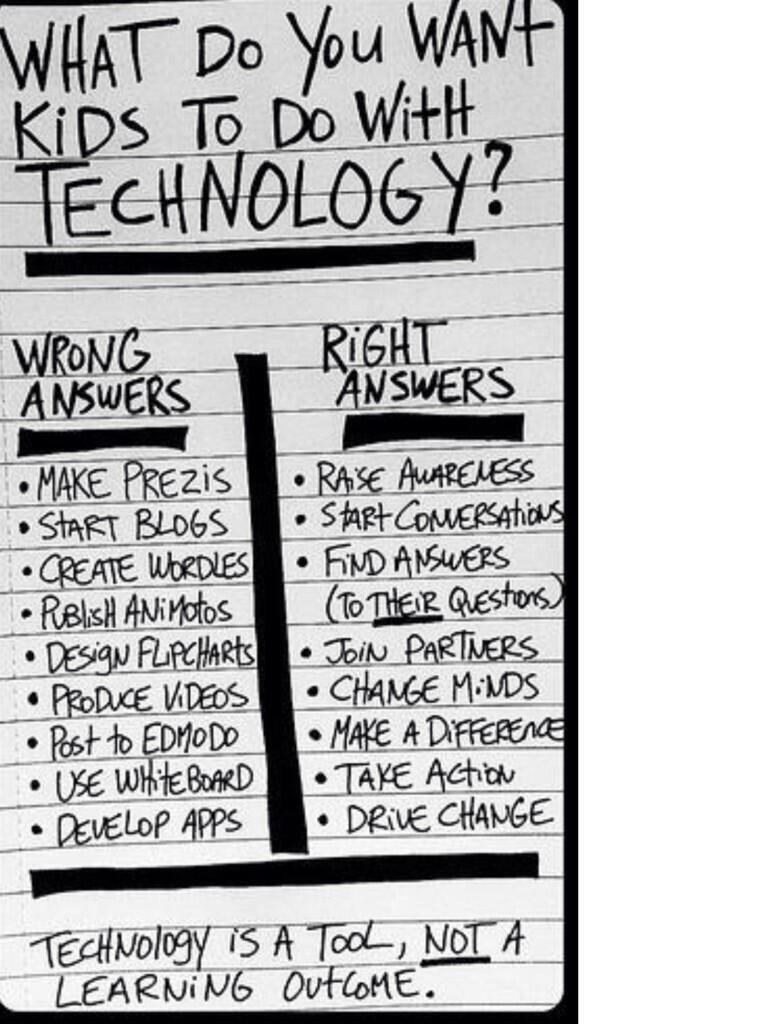
When we move towards Modification and Redefinition, we are re-designing learning tasks to create more authentic and insightful educational experiences. At these levels, students learning about the dangers of smoking are creating PSAs to share with their greater community. Students are using blogging sites to share their projects on delaying erosion with the global community. Students are creating content that has the potential to seriously drive change, change minds, and start meaningful conversations beyond their classroom walls. A summative project in a classroom should no longer be the multiple choice tests, but a product in which students can apply and share their knowledge. School should not be preparing students for the real world. They are already living in the real world! School should be a time when students are inspired to create an innovate, and taught how to use the tools that can bring those innovations to life. They should be taught how to collaborate and work towards goals. Web 2.0 Tools have the power to bring innovations to life, and it would be such a shame if educators did not use them to their full potential.
 So, what did my Spanish classroom actually look like? For the issue of content and direct instruction, I turned towards YouTube, Teacher Tube, Pinterest, Edmodo, and other communities where educators post their ideas and creations. I even created my own videos for our various topics and posted those to YouTube. To share all of this found and created content with my students, I chose Edmodo as my learning platform. If I were still teaching Spanish today, I would now be using Google Classroom in lieu of Edmodo, mainly because my district has moved towards using Google Apps for Education, and it becomes very easy to post created Google Docs and other items to Classroom.
When it came to formative assessment, I trialed many different tools. My students' favorite was Kahoot, a multiple choice clicker activity. We also used Socrative, Google Forms, Nearpods, and EdPuzzles. Socrative allows one to make multiple choice, short answer, and true/false questions that are graded automatically. Google Forms also allows one to create different types of tests and quizzes that can be graded quickly and automatically with Google Sheet add-ons such as Flubaroo and Super Quiz. Nearpods are slideshow presentations that have questions built into them, so students can learn new material and be quizzed as they go so the teacher can check for understanding. Lastly, Edpuzzles provide that same type of feedback, where students can watch a video that stops intermittently to as questions to assess understanding.
Finally, summative assessment is where the Web 2.0 tools really had their chance to shine. Considering Spanish is a subject in which assessing speaking is very important, students often made pod casts (using voice thread) and movies (using iMovie) to show that they have learned. Sometimes students made digital posters with spoken captions using EduCreations or ScreenChomp. Other times students made books in Spanish using Book Creator, or even made vocabulary games using TinyTap. Lastly, some students collaborated using Prezis or Google Slides to create final projects. These tools allow students to use visuals, text, and their voice to present on a topic.
If I were to continue to improve on our Spanish curriculum by integrating other web 2.0 tools, I would focus on using Web 2.0 tools to create more authentic experiences for my students. I would do this by using E-pals to find a class that would want to practice speaking Spanish. I would also like to use Skype to bring various Spanish speakers into the classroom so that students have the chance to interact with and listen to Spanish speakers from all over the world. My students were only beginners, but if I had an AP Spanish class, I would love to give my students the chance to converse with others in Spanish to pose solutions Global issues.

No comments:
Post a Comment