Sunday, June 28, 2015

Embedding Digital Texts

At one point in time, companies believes that MOOCs, or Massive Open Online Courses would change the face of education.  They thought that these courses would be the solution for more affordable and convenient education.  While "Digital Education" is alive and well (Digital texts, E-Learning, and Open course software), this type of education is best utilized when in conjunction with a more traditional setting.  Although the MOOC didn't quite take off as massively as it's name would suggest, there are many ways that teachers can embed these digital tools into their curricula and coursework.


Digital Texts

The last time I entered a library for research purposes was a very long time ago.  Most of the research I conduct now is done through online databases and other digital texts.  Even the majority of my course textbooks are digital,  which makes it much easier to annotate the text and review my notes. I can even have the text read aloud, means I could even do my "reading" while driving or outside where sometimes find it too bright to look at a book.  Digital texts can also make books more affordable, and these books often pack more punch for their value.  Digital texts can have interactive models and videos embedded right into their pages, as well as link the reader to other valuable resources.  I made digital texts for the Spanish course I taught, and my students loved it!  They were free, easily accessible, and fun to use.  Students could hear me pronouncing the new words, rather than taking home a textbook and trying to pronounce the new language, which can create poor pronunciation habits.  The books also included short formative assessment activities, so students were able to quiz themselves as see how they were progressing.   Click here to see 5 Places to Get Digital Textbooks.

E-Learning

Digital texts are not the only tools one can embed into their curricula.  Sites such as Khan Academy, YouTube, TeacherTube, Nearpod, and MANY more, are offering teachers free and amazing resources for teaching a myriad of subjects.  Some teachers are using E-Learning to amass resources to effectively flip their classroom, where students participate in self directed direct instruction, which then opens more class time for the application of the learned material.  For example, in my Spanish class, I would create boards on Blendspace that included all sorts of resources for direct instruction.  There would be links to Quizlet where students could practice new vocabulary, videos that exemplified the new vocabulary and grammar, videos created by myself that further reinforced the topic, digital games, and other resources for my students.  Students could use as many or as few of those links as they wanted, and then they were to complete a small homework assignment that could prove if they were getting a handle on the material.  The next day in class, we would use that assignment to launch into an activity, and sort out an questions or concerns the students had about the material.  While E-Learning can be engaging and effective, it is important that students are able to debrief with their teachers and peers.


Open Course Software

Perhaps you are a student who is progressing quite quickly through the high school math curricula.  Your teachers are beginning to fear that they cannot continue to provide challenging coursework.  Or, perhaps you wish to take German, but your school only offers Spanish and French.  Maybe you want to learn how to code, but your school does not offer any sort of Engineering or Computer Science courses.  This is where Open Course Software comes in.  Many highly esteemed universities (MIT and Yale, to name a few), offer free and challenging courses and software in many different content areas.  While this trend began as different types of Software (MIT's Scratch creation software),  many are now being accompanied with full Syllabuses, assessments, lesson plans, and more. (See here for a list of Universities offering course software and courses)

Sunday, June 21, 2015

Building Media Literacy


What are the skills needed to participate in our global society?  The National Education Association believes they are collaboration, communication, critical thinking & problem solving, and creativity & innovation.  Let's take a look at how these "Four Cs" can go hand in hand with media literacy education in the K-12 classroom.  

Media Literacy and Collaboration:

When it comes to working with others, students need to know firstly, how to give credit to those they may be working with.  When a student creates a project, they are ultimately using ideas from various authors, educators, etc.  In this way, they are collaborating with those works.  Students must learn how to properly give credit to the sources they have used in their own works.  I know in my college days, collaborating on a project meant that everyone took a piece and someone stitched it all together, without really verifying how each person came across their information.  The true spirit of collaboration would have students working together to assess the various sources used in a project, and teaching each other how to identify proper resources.  Students should be working together in this respect, and it should not always be up to the teacher to tell  the students if their sources are valid.


Media Literacy and Communication:

The internet has created all sorts of new ways for people to communicate.  There are many different ways to email, instant message, voice chat, video chat, and so forth.  It is important that students understand these different types of communications, and how to know if a communication is legitimate.  Students need to be able to differentiate between an email from a family member, and an email from the Prince of Nigeria who needs some money before he can then repay you handsomely.  Our students need to be taught not to click on the banner that says they have won an iPad, and not to respond to a message from a stranger asking them where they go to school.  Lastly, students need to learn that the information that they send out on the internet is not private.  Communication via the internet is  never one hundred percent protected, and therefore, students should not give out private information.


Media Literacy and Critical Thinking & Problem Solving:

One of the ultimate goals of media literacy is not only being able to evaluate and assess sources found online, but thinking critically about the many media messages that bombard students on a daily basis.  Learning how to dig out biases, see through false advertising, and think critically about these advertisements are skills that are essential to students in the 21st century.  For example, we all know by now that photo altering software is used heavily in the magazine world, yet we still strive for the perfection we see on magazine covers.  If more students had the skills to really think about the messages portrayed on those covers, would as many people still strive for such fake perfection?  Media literacy is built upon the skills of critical thinking and problem solving.

Media Literacy and Creativity & Innovation:

One great outcome of teaching Media Literacy, in my opinion, is having the skills to create your own media.  This not only requires technical know how, but both creativity and innovation skills.  Students should be given the opportunity to both assess and create media.  By learning how to create their own media, be it a video, slide presentation, picture collage, or music, students are allowing their own creativity to be woven into these media literacy skills.

Sources:
http://www.nea.org/assets/docs/A-Guide-to-Four-Cs.pdf


Sunday, June 14, 2015

Web 2.0 Tools

With the emergence of Web 2.0 tools, thousands of innovators have been creating apps and programs that are thought to have revolutionary capabilities when it comes to education.  I have been using web 2.0 tools in my classroom ever since my first day of teaching.  When I started my position as a Spanish teacher, I was asked to create a Spanish curriculum for a middle school using only iPads.  No books, no prior curricula to look at, and not even another teacher to collaborate with.  I'd now like to share with you some of the tools that I used during this time, and the pedagogy behind choosing the tools that I did. 

When examining the world of Web 2.0 tools, one must really examine the purpose of any given tool.  To closer inspect these apps, one can look to a combination of Bloom's Taxonomy and the SAMR Model.  When referring to Blooms, one can decide how a tool may assist with basic tasks such as remembering and understanding, to the more complex tasks of applying, analyzing, evaluating, and creating.  A web 2.0 tool like Quizlet that allows one to create and study their own flashcards may help in the earlier levels of Blooms, where a tool like iMovie that can allow a student to make a video that exemplifies the vocabulary they have been studying takes the learning even deeper.  Next, the SAMR model allows us to evaluate digital tools in a different manner.


Technology is changing the face of education at a pretty rapid pace, but teaching pedagogy has been having a hard time keeping up.  Some teachers may see Web 2.0 tools as simply a Substitution  for an old school method of teaching.  An example of this would be using Evernote to take and organize notes instead of a notebook.  The next level of SAMR is when a tool is used to Augment a task, meaning it is more of an advanced substitution.  Perhaps a teacher is using a Google Form to give a multiple choice test, as opposed to using paper. This allows the test to be graded faster, and the teacher can compare data easier and faster.  At the end of the day, however, the teacher is still giving a slightly more upgraded multiple choice test.  There is still a place in education, I believe, for these lower levels of Blooms and SAMR.  Sometimes we just need to sit down with some flashcards and study our Spanish vocabulary.  Summative tasks using Web 2.0 tools, however, should really be heading towards the last levels of SAMR:  Modification and Redefinition.

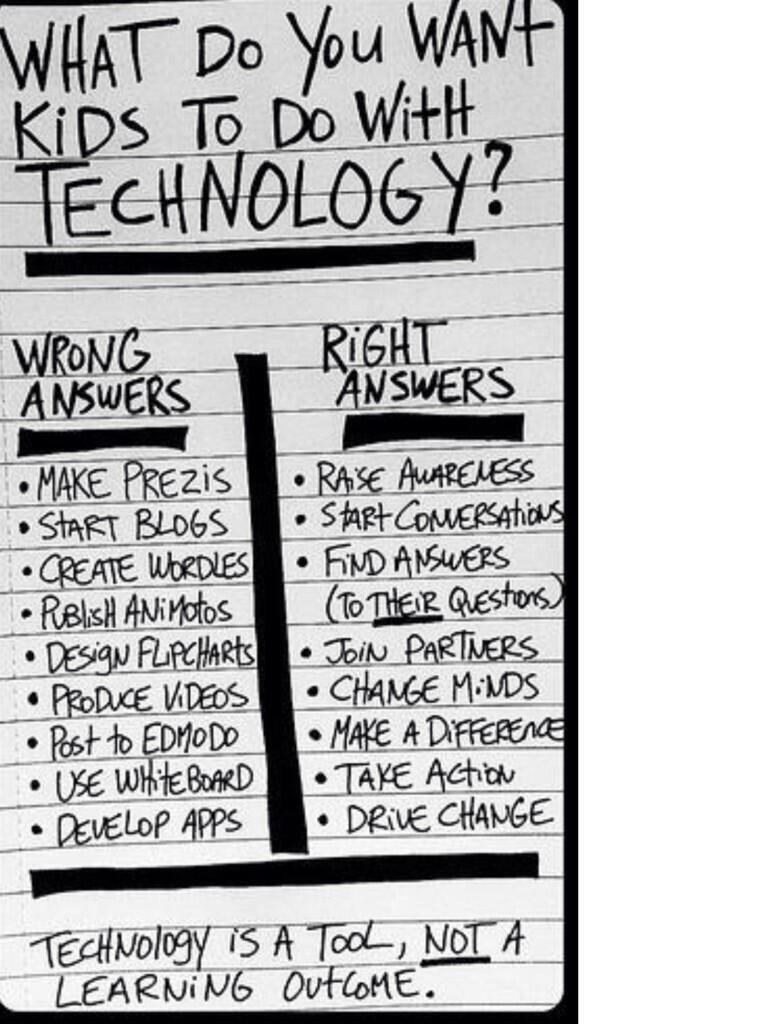
When we move towards Modification and Redefinition, we are re-designing learning tasks to create more authentic and insightful educational experiences.  At these levels, students learning about the dangers of smoking are creating PSAs to share with their greater community.  Students are using blogging sites to share their projects on delaying erosion with the global community.  Students are creating content that has the potential to seriously drive change, change minds, and start meaningful conversations beyond their classroom walls.  A summative project in a classroom should no longer be the multiple choice tests, but a product in which students can apply and share their knowledge.  School should not be preparing students for the real world.  They are already living in the real world!  School should be a time when students are inspired to create an innovate, and taught how to use the tools that can bring those innovations to life.  They should be taught how to collaborate and work towards goals.  Web 2.0 Tools have the power to bring innovations to life, and it would be such a shame if educators did not use them to their full potential.  

So, what did my Spanish classroom actually look like?  For the issue of content and direct instruction, I turned towards YouTube, Teacher Tube, Pinterest, Edmodo, and other communities where educators post their ideas and creations.  I even created my own videos for our various topics and posted those to YouTube.  To share all of this found and created content with my students, I  chose Edmodo as my learning platform.  If I were still teaching Spanish today, I would now be using Google Classroom in lieu of Edmodo, mainly because my district has moved towards using Google Apps for Education, and it becomes very easy to post created Google Docs and other items to Classroom.

When it came to formative assessment, I trialed many different tools.  My students' favorite was Kahoot, a multiple choice clicker activity.  We also used Socrative, Google Forms, Nearpods, and EdPuzzles.  Socrative allows one to make multiple choice, short answer, and true/false questions that are graded automatically.  Google Forms also allows one to create different types of tests and quizzes that can be graded quickly and automatically with Google Sheet add-ons such as Flubaroo and Super Quiz.  Nearpods are slideshow presentations that have questions built into them, so students can learn new material and be quizzed as they go so the teacher can check for understanding.  Lastly, Edpuzzles provide that same type of feedback, where students can watch a video that stops intermittently to as questions to assess understanding.  

Finally, summative assessment is where  the Web 2.0 tools really had their chance to shine.  Considering Spanish is a subject in which assessing speaking is very important, students often made pod casts (using voice thread) and movies (using iMovie) to show that they have learned.  Sometimes students made digital posters with spoken captions using EduCreations or ScreenChomp.  Other times students made books in Spanish using Book Creator, or even made vocabulary games using TinyTap.  Lastly, some students collaborated using Prezis or Google Slides to create final projects.  These tools allow students to use visuals, text, and their voice to present on a topic.

If I were to continue to improve on our Spanish curriculum by integrating other web 2.0 tools, I would focus on using Web 2.0 tools to create more authentic experiences for my students.  I would do this by using E-pals to find a class that would want to practice speaking Spanish.  I would also like to use Skype to bring various Spanish speakers into the classroom so that students have the chance to interact with and listen to Spanish speakers from all over the world.  My students were only beginners, but if I had an AP Spanish class, I would love to give my students the chance to converse with others in Spanish to pose solutions Global issues.


Sunday, June 7, 2015

Evaluating Technological Tools

Professional Learning Networks, or PLNs, have become an important resource for teachers looking to stay up to date in their content areas while sharing their own expertise with the greater teaching community.  The world is becoming increasingly connected, so why not share what we know to support and inspire each other.  

In blog post by Allison Rossett, she shares this great graphic of how PLNs can be created and used:

In other words, in order to sustain a PLN, educators must first have places in which they can research and find information.  Blogs, Websites, Wikis, Podcasts, and other sources contain a plethora of information to be discovered and internalized.  In order to have a real PLN, one must share their ideas and research with other educators.  To accomplish this, educators are turning to various Social Media platforms which allow them to not only disseminate information quickly, but engage in real time conversations with other educators.  The above graphic lists Twitter, Edmodo, and Facebook, among some of the top tools that educators are using to share information.  I'd like to share with you some of my favorite sources of information aggregation, as well as the platforms I enjoy for sharing found information.

Information Aggregation

One blog that I absolutely love, being that I am a Technology Integration Specialist, is FreeTech4Teachers.  This blog, which is updated daily and also has a Twitter and Facebook page that can be followed, provides wonderful information on how technology can be integrated into the classroom.  This site saves me a lot of time on testing new tools to see which ones work for my students.

As far as Podcasts, that is a world that I have sadly only dipped a toe into.  I know there is a wonderful world of educational Podcasts to follow, I just haven't quite gotten there yet.  One that I can recommend, having explored its visual counterpart, is the Ted Talks Podcast.  For those of you looking to expand your Podcast library, here is a list of 50 Educational Podcasts You Should Check Out.

My Google RSS feeder use to be my most favorite tool in the world for reading articles relevant to my interests.  Unfortunately, Google's RSS feeder has been gone for quite some time now, and although I am still a little bitter about it, I've done my best to move on to other RSS feed tools  I've flirted with Feedly, but I am still not as into that app as I was my Google RSS feed.  That is more likely the fault of myself not re-amassing subscriptions to various blogs, rather than the fault of the tool itself.  While an RSS feed tool may not be in the cards for myself any longer, I would recommend Feedly as the best replacement I could find.

After consulting blogs, wikis, podcasts, and other various websites, it is important to be able to save the tools you like in a somewhat organized manner.  Simply bookmarking the tool doesn't quite cut it here if you ever want to be able to find it again.  For this, I love using DIIGO, a bookmarking tool that allows you to tag your bookmarks and describe them so you are able to not only find them again, but you remember what the tool was in the first place.  You can also share your bookmarks with others, making this the perfect tool for collecting bookmarks for a PLN.

Social Media Connections

When it comes to sharing information with a PLN, Twitter seems to be a favorite among educators.  I recently attended a conference by Alan November, who mentioned numerous times that if we educators were not using Twitter, then we should rethink that right away!  While I enjoy Twitter for amassing inspirational "hits" of knowledge, I prefer a tool that can help me go in more depth on a topic.  For those instances, I turn to networks like Edmodo or Google Hang Outs.

What I enjoy about Edmodo is being able to create groups where people can go to have conversations that are not limited to 140 characters.  It also feels a little more like a social group, and I feel more comfortable expressing my ideas with the same group of people, rather than sparking a conversation that can be accessible by any given soul with a Twitter account.  For me, Edmodo makes my conversations feel more scholarly and targeted. I can ask a group of Spanish teachers for advice on an upcoming activity, and I know I will have helpful responses from certified educators.

Lastly, I enjoy using Google Hangouts, or other types of video chatting software because I believe face time is very important in a PLN.  I love tuning in for lectures and tutorials, as well as hosting my own.  Learning no longer needs to take place inside of a classroom, but I believe it's important to create spaces that are "classroom like", aka a space for people to gather in order to discuss a topic.  Google Hangouts and other video chatting spaces can provide that space for intellectual discussion.

Resources

50 Educational Podcasts You Should Check Out - Getting Smart by Guest Author -. (2013). Retrieved June 7, 2015, from http://gettingsmart.com/2013/02/50-educational-podcasts-you-should-check-out/

The Connected Educator: Building a Professional Learning Network « Allison Rossett. (2012). Retrieved June 7, 2015, from http://www.allisonrossett.com/2012/07/17/the-connected-educator-building-a-professional-learning-network/


Sunday, May 24, 2015

Moral and Legal Issues

With our world becoming an ever increasingly interconnected place, it is crucial that our students are learning how to be respectful and ethical when making these connections. Likewise, with assignments and learning taking place partly in the digital world (or even completely, if you're in a fully online course), it is important that students know what constitutes plagiarism when completing these assignments. 

As soon as I teach students how to copy and paste, we start talking about when it is appropriate to use this almost magical shortcut. Just the other day, I was assisting students in making word clouds with Tagxedo. Many were printing out their word clouds to add to posters they were making. When one prints a Tagxedo, it has "Created on www.tagxedo.com" printed across the bottom in small letters. Many of the students wanted to cut off that piece because they didn't like how it looked. This was the perfect opportunity to talk with my students about how it's important to give credit to others. I have also taught my students how to use the Research tool when searching for photos in a Google Doc, because those photos will be automatically cited at the bottom of the page.

When it comes to digital citizenship, there are many ways to make this accessible to students of all ages. I like to begin by talking about the popular video game, Minecraft. I use this example, "You are on a server with your friends. You find your friend's house, and discover a hidden chest full of diamonds. There are so many, you think they wouldn't notice if you just took three to make a diamond pickax. After all, with a diamond pickax, you could mine twice as fast and most likely find more diamonds to replace the ones you took. So, do you take the diamonds?" It's really eye opening to see the various responses of the students. Some believe it would be fine, as long as they were replaced. Others said they would ask their friend first. Some students even admitted to having lived this scenario, and said they took ALL of the diamonds. When their friend found out about the diamond heist, they in turn when and blew up the offender's house. It's quite interesting to study digital citizenship in the microcosmic that is Minecraft, especially how students tend to feel less guilty about stealing diamonds when they are on a server with strangers, and not their friends.

When it comes to morality and legal issues concerning the internet, there are no shortages of ways to introduce the topics to students. Many are already living in realities in which they face these types of decisions on an almost daily basis. With a computer in every pocket, students need the skills to navigate the digital world safely and successfully. They need to learn when their decisions can cross the line from immoral to illegal. Lastly, they need to remember that what they post on the internet can live on infinitely and cross the globe in a matter of seconds. That is a huge responsibility, and we are putting this technology in the hands of children tweens and teens who are still developing morally and intellectually.

How will you guide students in having moral and ethical success with technology?

Resources
“Minecraft.” Minecraft. N.p., n.d. Web. 24 May 2015. <http://www.minecraft.net/>
“Tagxedo - Word Cloud With Styles.” Tagxedo. N.p., n.d. Web. 24 May 2015. <http://www.tagxedo.com/>

“| Common Sense Media.” Reviews &amp; Age Ratings. N.p., n.d. Web. 24 May 2015. <http://www.commonsensemedia.org/>


Sunday, May 17, 2015

Using Blended Learning to Promote Global Education

"The heart of global education is enabling young people to participate in shaping a better, shared future for the world...[it] emphasizes the unity and interdependence of human society, developing a sense of self and appreciation of cultural diversity, affirmation of social justice and human rights, as well as building peace and actions for a sustainable future in different times and places" (www.globaleducation.edu.au).

Now, how can we use blended learning, which utilizes technology to create a more student centered, individualized way of learning, to promote global education?

As mentioned above, blended learning emphasizes using technology to reach different learning objectives.  With its propensity towards creation and innovation, technology can assist students in reaching higher order thinking skills that are achieved when students are able to exemplify knowledge through hands on tasks.  In linking those tasks to real world, authentic, and global situations, we can succeed in using blended learning to promote global education.

Perhaps students are studying ecology, and one student wishes to narrow down his or her research to the ecology of the rain forest and rain forest preservation.  With a blended learning approach, that student can use technology to connect with an expert in Costa Rica and learn about the different ways Costa Rica is preserving their rain forests.  When it comes time for the student to create his or her own project on rain forest preservation, the project can be created on a web 2.0 platform, such as Google Slides or Prezi, that allows it to be shared with the world.  In sharing this project beyond the classroom walls, the student is taking part in global education by putting out a resource to the world that, "provides actions for a sustainable future".  

In summary, global education is nearly impossible to achieve without technology.  Technology is the cornerstone for blended learning.  This allows blended learning to be the perfect platform for promoting global education.  Through blended learning, we can inspire students to create and share knowledge that furthers, "The unity and interdependence of human society."


Resources

Global Education. Retrieved May 17, 2015, from http://www.globaleducation.edu.au/global-education/what-is-global-ed.html

O'Connor, Christine, Dennis Mortimer, and Sue Bond. 2011. "BLENDED LEARNING: ISSUES, BENEFITS AND CHALLENGES." International Journal Of Employment Studies 19, no. 2: 62-82. Business Source Complete, EBSCOhost (accessed May 17, 2015).

Sunday, May 10, 2015

Tools for Global Communication

Students participate in a Mystery Skype

There are many tools and resources available for a K-12 classrooms to enhance communication across the globe.  In order to accomplish connection, I have broken the tools down into three categories:  Finding connections, tools for connecting, and tools to help educate and prepare students for global connections.

Finding Connections


When I was a Spanish teacher looking to connect my students with Spanish speaking classes, I would first turn to Edmodo.  Edmodo contains many PLCs (Professional Learning Communities), and makes it super easy for educators to connect with one another.  With a simple post to the Spanish message board, I could have five different teachers responding with invitations to connect with my class.  Twitter can also provide a similar outlet for these connections, it's just a matter of finding the right #hashtag.  If the openness of Twitter seems a bit daunting and frightening, sites like ePals and LumenEd provide safer alternatives to finding a class for your students to connect with.  Now that you've found a way to establish connections, let's discuss the different tools available for actually connecting.


Tools for Connecting


When it comes to connecting with others, you can employ a myriad of low tech to highest tech methods.  Some may opt for snail mail (and who says a letter cannot be typed and printed?), while most looking for a faster way to connect will turn to email, messaging, and video conferencing.  My go to email is Gmail, which provides an almost unlimited amount of storage.  For messaging,  students can converse via Gchat, Twitter, Facebook, or other international SMS tools such as Viber and WhatsApp.  The funnest way to communicate, in my option, is via video chat.  The three main video chatting services I subscribe to (all for free), are Skype, Facetime, and Google Hangouts.  Now that you're able to communicate with your new global pals, let's take a look at how an educator may be able to enhance the experience.


Preparing students for and Enhancing Global Connections


Before connecting with students from another country, I believe it's important lay a little ground work first.  Using Google Earth, students can view the country they will be connecting with and explore its geography and topography.  Students can also visit the World Fact Book and other global data bases to obtain a base knowledge of the country they will be connect with.  There are also tools to enhance communication with others. Games that I regularly play in the classroom, like Kahoot and Socrative, can be played by parties in both countries at the same time.  Students can also post ideas to the same virtual boards like Pinterest and Padlet.  Imagine both classes writing and sharing book reports about the same book, sharing those ideas via a blog, and seeing how the points of view are similar and different, and how cultural influences can affect opinions.  Finding and connecting with others is the simple first step.  Determining how these connections will foster an authentic exchange of knowledge and increase student awareness of global issues and cultures is what should be kept in the foreground of arranging these connections.


Additional Resources

For additional ideas and resources, visit:

http://www.fractuslearning.com/2013/05/31/global-classroom-connections/

http://www.insight.com/insighton/education/around-world-10-tools-help-classrooms-connect/

http://www.edudemic.com/5-tool-combinations-for-globalizing-class/